Your blog looks exactly the way you wanted. The pages feel fast, the design reflects your business, and WordPress makes publishing straightforward. Then a question interrupts the excitement: what happens to your SEO plugin when WordPress no longer displays the website?
Affiliate disclosure: This article contains affiliate links to Rank Math. If you make a purchase through one of these links, Palena Digital may earn a commission at no additional cost to you. The recommendations below explain where the product fits and what your website still needs to implement.
It is a reasonable concern. You can spend time writing a search title, improving a description and choosing a social image in WordPress without knowing whether those settings ever reach your public pages.
Yes, Rank Math works with headless WordPress. It provides an API that lets a separate frontend retrieve its SEO metadata. However, your React website must integrate that information and deliver it correctly. Installing the plugin in WordPress does not complete that connection.
That distinction determines whether your publishing workflow is dependable or merely looks finished inside the dashboard.
This guide explains how the connection works, which decisions deserve attention, and how to verify the result. Technical references come from official Rank Math, Google and React documentation. The domains, configurations and diagrams are illustrative examples.
If you want WordPress publishing with a custom React website, Rank Math deserves a place on your shortlist. Its documented metadata endpoint gives your developer a clear starting point while keeping editorial SEO decisions close to your content.
Explore Rank Math for your WordPress website.
What you will learn
- What changes when WordPress becomes a headless CMS.
- How Rank Math supplies metadata to a React website.
- How to handle public URLs, rendering, schema and sitemaps.
- How to keep SEO settings current after an article changes.
- How to test the public page before relying on your setup.
What does headless WordPress actually mean?
On a traditional WordPress website, the same installation manages your content and uses a theme to display it. You write a post, publish it, and WordPress produces the page visitors receive.
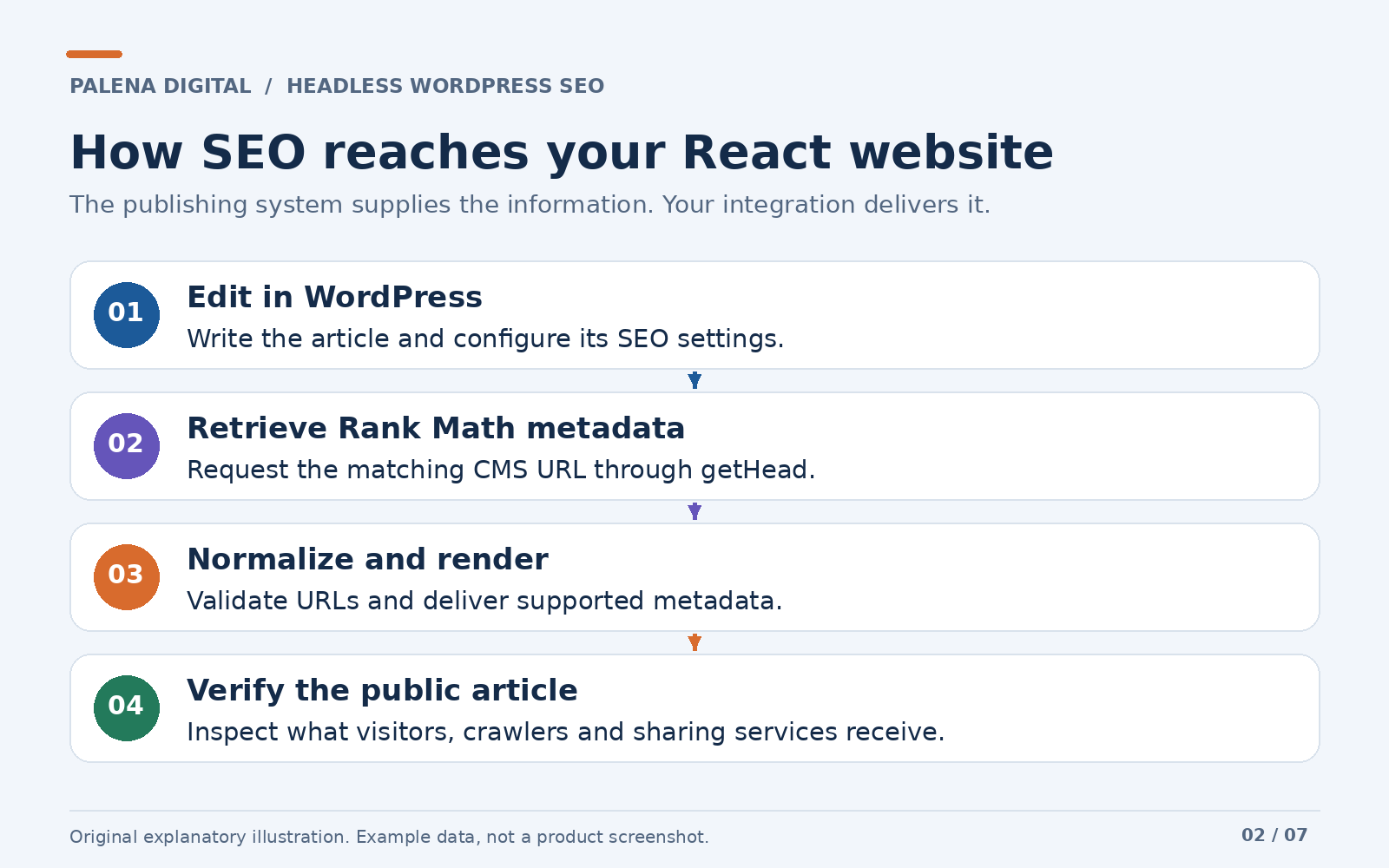
Headless WordPress separates those responsibilities. WordPress remains the publishing system, while another application builds the public website. That application might use React directly or a React framework such as Next.js.
Think of a publisher and a printing service. The publisher stores and edits the material, while the printing service decides how the finished publication is produced. The arrangement works when the right information passes between them.
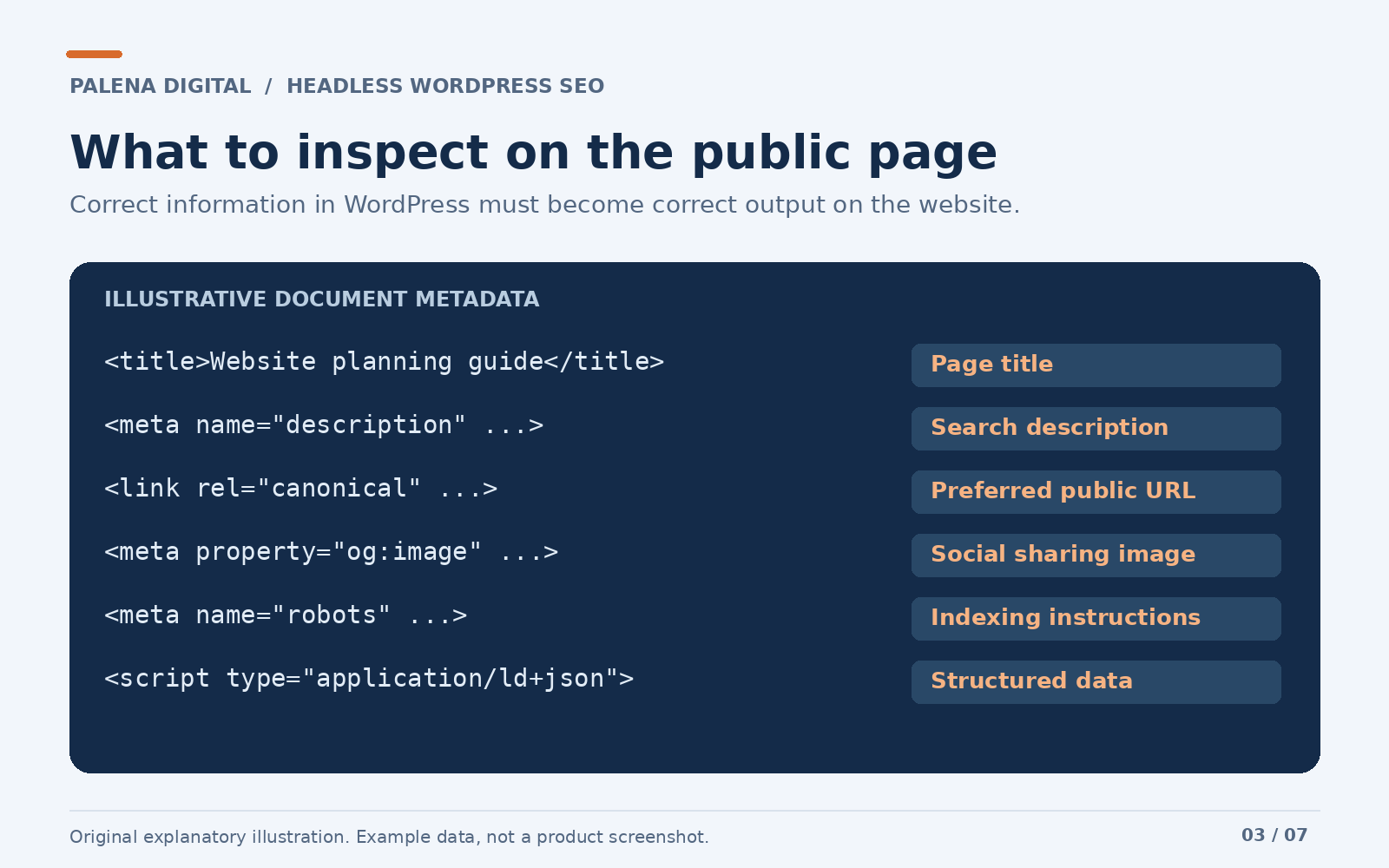
For a website, that information includes more than the article body. It also includes the page title, preferred public address, description, image details and information describing the content.
Here is a fictional example we will use throughout:
| Responsibility | Example address | Purpose |
|---|---|---|
| WordPress CMS | https://cms.example.com | Stores articles and editorial settings |
| Public React website | https://www.example.com | Displays the pages people visit |
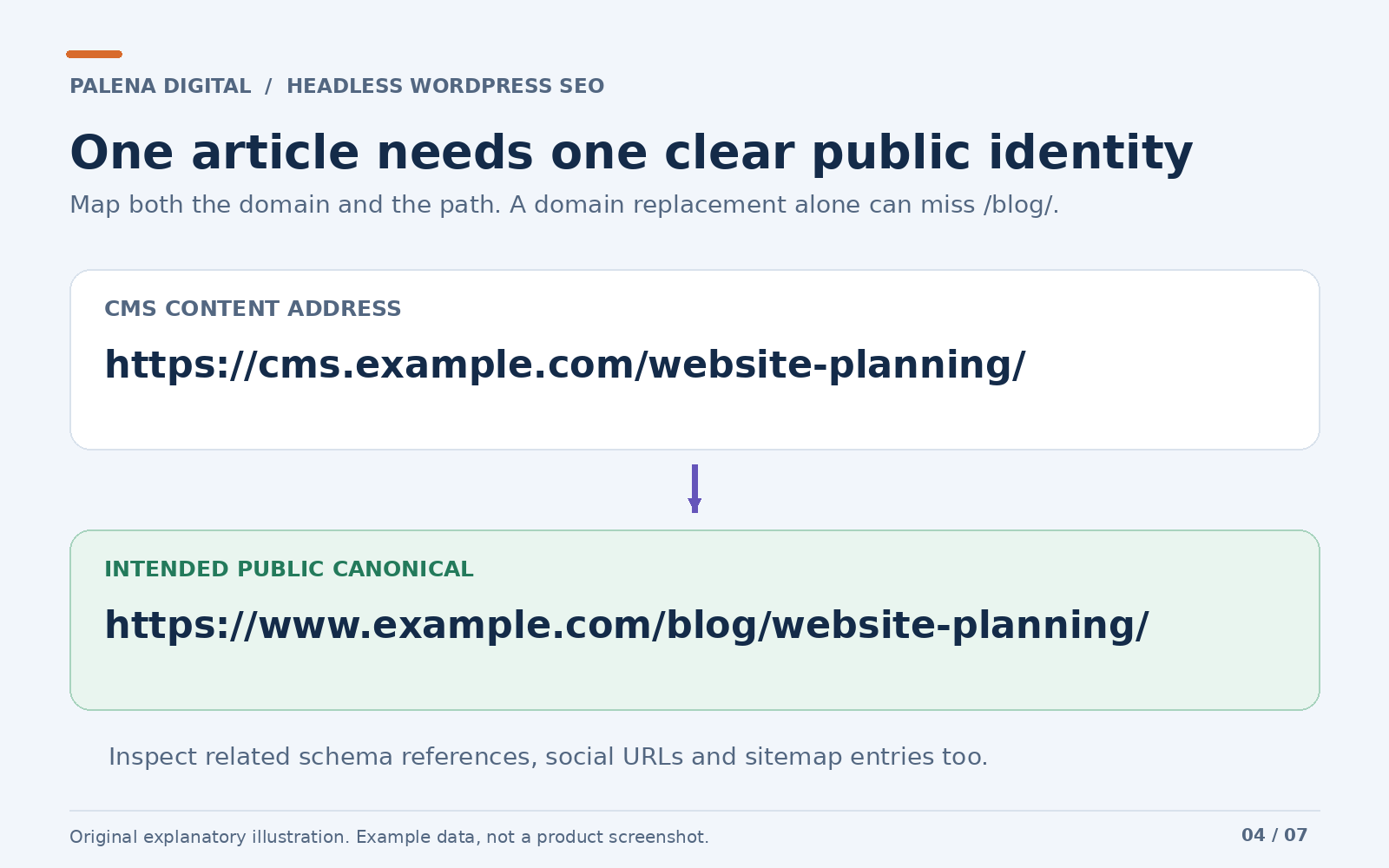
| WordPress article | https://cms.example.com/website-planning/ | Identifies the article inside the CMS |
| Public article | https://www.example.com/blog/website-planning/ | Provides the version intended for readers and search |
The two article addresses refer to related content, but their paths differ. Therefore, a reliable integration needs an explicit relationship between them.
Why an SEO plugin still matters
A separate frontend does not remove the need for editorial SEO decisions. Someone must still decide how an article should be described, which image represents it, and which public address should be treated as its preferred version.
Without a shared system, those decisions can become scattered across WordPress fields, frontend code and deployment settings. A simple description change can turn into a request to a developer.
Rank Math can keep much of that editorial work within WordPress. Its value in this arrangement is a consistent place to manage SEO information that your frontend can consume.
Consider an agency publishing a guide to planning a business website. The writer understands the article and can choose an accurate search description. There is little benefit in making that person ask a developer to copy the same description into a separate configuration file.
The practical goal is straightforward: let editors manage the content and its SEO settings together, then make the website publish both reliably.
That is a useful reason to consider Rank Math even when a WordPress theme never appears on the public website.
Where that value becomes practical
Imagine a business with an editor publishing articles and a developer maintaining its React website. The editor wants to improve an article description after receiving customer questions. The developer wants the site to publish accurate metadata consistently without maintaining a second copy of every editorial decision.
Rank Math can support that division of work. The editor manages the article and its SEO settings in WordPress, while the integration handles the technical delivery. You establish the connection once, then maintain a publishing process that can serve many articles.
The benefit is a clearer workflow as your content library grows. There is less ambiguity about where an editor should change a description or which system should supply the information. The final quality still depends on a sound integration, but your team has a defined place to begin.
That is also why I would evaluate the workflow before comparing long feature lists. A tool becomes valuable when it helps the people responsible for your website do their work consistently.
What Rank Math handles, and what your frontend handles
A clear division of responsibility prevents expensive misunderstandings.
| Area | Role of Rank Math in WordPress | Responsibility of the public website |
|---|---|---|
| SEO metadata | Generates configured metadata for the WordPress content | Retrieves, interprets and delivers it for the matching public page |
| Editorial changes | Stores the settings editors update | Refreshes cached or generated pages after relevant changes |
| Canonical addresses | Produces an address according to its configuration and filters | Ensures the final address matches the public URL policy |
| Structured data | Can produce configured schema output | Preserves valid, relevant data without conflicting duplicate entities |
| Routing | Operates within the WordPress environment | Serves the correct public routes, redirects and error responses |
| Discovery | May provide a WordPress sitemap | Ensures the submitted sitemap represents intended public pages |
This table is an implementation model. The exact handoff depends on your configuration and the features you enable.
For example, a redirect configured on the CMS server will not necessarily run when a visitor requests an address on a completely separate frontend host. Your public application or hosting layer must handle that request.
Similarly, an SEO setting for a WordPress post will not automatically cover a service page that exists only in React. Every public route needs an owner for its metadata, whether that owner is WordPress or a frontend content model.
How Rank Math connects to headless WordPress
Rank Math documents a headless CMS option under Rank Math SEO → General Settings → Others. Advanced Mode may be necessary to see the relevant settings. After enabling the option and saving, your application can request metadata through its getHead REST endpoint.
The request includes a complete WordPress URL. The documented response includes success and head, with head containing HTML metadata rather than a collection of separate title and description fields. See the official headless CMS documentation for the request contract.
An example request is:
https://cms.example.com/wp-json/rankmath/v1/getHead?url=https%3A%2F%2Fcms.example.com%2Fwebsite-planning%2FThe important work begins after retrieval. Your application must associate that response with the correct public route, resolve any address differences, and render the appropriate elements.
An API response that contains the right information is a useful milestone. The public page remains the place where the integration must prove itself.
A small retrieval example for developers
The following server or build process example demonstrates the fetch step. It is illustrative JavaScript, not a complete React integration. It deliberately leaves rendering and metadata normalization to the application.
const CMS_ORIGIN = 'https://cms.example.com';

export async function getRankMathHead(cmsArticleUrl) {
  const articleUrl = new URL(cmsArticleUrl);

  if (articleUrl.origin !== CMS_ORIGIN) {
    throw new Error('Expected an article from the configured CMS');
  }

  const endpoint = new URL(
    '/wp-json/rankmath/v1/getHead',
    CMS_ORIGIN
  );

  endpoint.searchParams.set('url', articleUrl.href);

  const response = await fetch(endpoint, {
    signal: AbortSignal.timeout(8000)
  });

  if (!response.ok) {
    throw new Error(`Metadata request failed: ${response.status}`);
  }

  const result = await response.json();

  if (result.success !== true || typeof result.head !== 'string') {
    throw new Error('The CMS returned an unexpected metadata response');
  }

  return result.head;
}
Use a runtime that supports the APIs shown, or supply the appropriate equivalents. Define caching and retry behavior within your chosen platform rather than assuming that every environment treats fetch identically.
The origin check limits this helper to the configured CMS. Nevertheless, the returned HTML still deserves deliberate handling. Parse trusted CMS output with an HTML parser, select supported elements, validate addresses, and handle structured data separately.
Avoid copying an arbitrary HTML string into the page body and assuming that it becomes functioning document metadata. Likewise, a generic HTML sanitizer can remove structured data scripts unless you have designed the pipeline to preserve valid JSON safely.
Begin with one article and a clear URL policy
Before building the integration, choose a representative article. Record its CMS address, intended public address and current SEO settings.
This small preparation step helps you distinguish a routing problem from a metadata problem. If the application loads the wrong post, even perfectly generated metadata will describe the wrong content.
Write down the decisions that should apply across the site:
- Which domain is the public website?
- Does the blog use a
/blog/prefix? - Do public pages use a trailing slash?
- Which archive pages should be accessible and indexable?
- What happens when an article slug changes?
- Which system produces the final canonical address?
For our fictional site, the mapping is explicit:
CMS content: https://cms.example.com/website-planning/
Public page: https://www.example.com/blog/website-planning/
Request the CMS content through the address WordPress can resolve. Then apply the agreed public mapping to the relevant output. Do not assume the metadata endpoint can resolve every frontend route merely because the two systems share an article.
Choose how React will deliver the page
React describes a user interface. Your rendering setup determines when that interface becomes HTML and what a visitor or crawler receives before JavaScript runs.
Google can render JavaScript, but Google’s JavaScript SEO guidance also recommends considering server rendering or prerendering because not every bot executes JavaScript. For a public business blog, I recommend a setup that delivers useful article content and dependable metadata without relying entirely on a browser fetch.
| Approach | How the page is produced | Practical consideration |
|---|---|---|
| Static generation | HTML is produced during a build | Publishing changes must trigger an appropriate rebuild |
| Server rendering | The server produces HTML for a request | CMS availability, caching and response time need attention |
| Regeneration | Previously generated content refreshes according to a policy | Editors need a predictable freshness window |
| Browser rendering | JavaScript loads content after the initial response | Content and preview delivery require additional verification |
There is no universal winner. A blog publishing twice a week has different operational needs from a publication updating throughout the day.
What matters is choosing intentionally. A very attractive loading screen is still a loading screen if the article never arrives for a crawler or preview service.
If your website uses Next.js
Next.js provides a Metadata API, including generateMetadata. A developer can normalize the relevant CMS information into the framework’s supported metadata fields and handle JSON structured data separately.
However, Rank Math’s HTML response is not already a Next.js metadata object. It needs a considered translation layer or another supported integration method.
Current Next.js versions can also stream metadata, with different behavior for bots that require HTML. Therefore, inspect the behavior of your actual framework version and deployment rather than assuming every response will have an identical source layout.
If your website uses React with Vite
Vite alone does not establish a complete rendering and SEO strategy. Check whether the project uses browser rendering, prerendering or an additional server setup.
React 19 supports placing document metadata from components into the document head. The React metadata reference explains that behavior. Nevertheless, moving a tag into the head after a browser fetch does not make its value available in the original server response.
Choose a metadata solution compatible with the React version you actually use. Then verify direct page requests and navigation between articles, because those are separate paths through your application.
Make canonical URLs point to the intended public pages
The canonical address tells search engines which version of a page you prefer when similar or duplicate versions exist. Google treats canonicalization as a selection process using several signals, so your declaration is important without being an absolute command. See Google’s canonical URL guidance.
For the fictional article, the intended declaration is:
<link rel="canonical"
      href="https://www.example.com/blog/website-planning/">
If the public page instead declares the CMS address, the integration is sending an inconsistent message about which version should represent the article.
Check the entire public address, including its path. Replacing cms.example.com with www.example.com would still leave the wrong URL if your public website adds /blog/.
Rank Math documents a canonical filter among its developer hooks. Your developer can use an appropriate CMS customization or a deliberate frontend normalization layer, depending on the architecture. Either way, define one clear policy and test it across posts, categories and pagination.
Avoid a broad text replacement across all returned HTML. A CMS image address may be entirely correct, even when the canonical address requires a different host and path. Images, author identities and article URLs serve different purposes.
Treat each address according to what it represents. That makes the integration easier to maintain as the website grows.
Write titles and descriptions that deserve the click
The technical connection exists to deliver useful editorial choices. It cannot rescue a title that tells readers very little about the page.
Compare these fictional titles:
| Generic title | More useful title |
|---|---|
| Business Websites | How to Plan a Business Website Before Hiring a Developer |
| Our New Blog Post | Website Planning Checklist for Small Business Owners |
| SEO Guide | Rank Math With Headless WordPress: A Practical React Guide |
The stronger versions make the subject and reader benefit clearer. They do not need exaggerated claims to earn attention.
Google can generate title links from several page signals, including the title element and prominent headings. Therefore, keep your SEO title, main heading and actual subject aligned. Google’s title link documentation explains why the displayed result may differ from the title you supply.
For a description, aim to answer a reader’s immediate question:
Learn how Rank Math connects to headless WordPress and React, with practical checks for metadata, canonical URLs, schema and publishing updates.
A concise description like this explains the value without repeating the same phrase several times. Google may choose a different snippet according to the search query, because descriptions are one possible source for its automatically generated summaries. See Google’s snippet guidance.
Use preview lengths as editorial guidance. There is no single character count that guarantees how a result appears on every device.
Once the integration is working, this becomes a comfortable editorial routine: write a useful article, choose a clear title and description, then verify the published result. If that is the workflow you want, take a closer look at Rank Math and assess it against the content you actually publish.
Keep social previews connected to the article
Imagine sending an article to a prospective client. Instead of the intended image and headline, the preview shows a generic logo or an old homepage description.
That experience can undermine the care you put into the content. Therefore, social metadata deserves a place in your release checks.
Inspect the intended title, description, image and public URL for each article. Open Graph and card metadata should describe the page being shared, while the image must be reachable without an administrator session.
Also test the actual platform you care about. Preview services have their own fetching and caching behavior, so a corrected page may not immediately produce a refreshed preview everywhere.
If an image changes, inspect whether the website published the new address and whether the sharing platform is still using an earlier fetch. Those are different problems and need different fixes.
For business content, choose an image that reinforces the article’s subject. A readable illustration of the WordPress and React connection can be more informative than a decorative image that merely looks technical.
Preserve accurate structured data
Structured data gives search engines explicit information about a page and the entities it describes. For a blog article, that can include its headline, author, images and publication dates. Google’s Article documentation describes the supported properties and examples.
In a headless integration, review what the CMS produces before adding another schema system to React. Otherwise, two systems may describe the same article using conflicting addresses, authors or dates.
Multiple structured data scripts are not automatically a problem. The concern is whether their entities remain consistent and correctly connected.
For our fictional article, inspect these details:
- The headline matches the published subject.
- The author identifies the person or organization responsible for the article.
- Article and page identifiers follow the intended public URL policy.
- Image addresses load publicly.
- Publication and modification dates reflect real events.
- Breadcrumb references match the public website structure.
Use the Rich Results Test for supported Google features and a schema validator for broader vocabulary checks. A successful syntax check does not prove that the content is accurate, and valid markup does not guarantee a rich result. Google’s structured data policies make that distinction clear.
Do not add ratings that visitors cannot substantiate or refresh modification dates merely to make an unchanged article appear recent. The schema should describe the publication honestly.
What about FAQ schema?
Questions remain useful when they address genuine reader uncertainty. However, Google states that FAQ rich results are no longer shown in Search, as recorded in its documentation updates.
Include an FAQ section because it helps people understand your subject. Avoid choosing a plugin or adding markup on the promise of obtaining an FAQ search display that Google no longer offers.
Check the sitemap that search engines will actually use
A sitemap should help search engines discover the public pages you want them to consider. A technically valid XML file can still be wrong for your architecture if it lists CMS addresses instead of the intended public URLs.
Open the sitemap and inspect several entries manually. Include an article, a category if relevant, and a recently changed URL.
For a website with different CMS and public routing, choose a maintainable solution. Your developer might generate a public sitemap from the content inventory, adapt the CMS sitemap deliberately, or expose a correctly transformed version through the public host.
Whichever approach you choose, keep it aligned with the public canonical policy. Remove addresses for drafts, redirects and pages that are intentionally excluded from indexing.
Google explains that a sitemap assists discovery without guaranteeing crawling or indexing. Its sitemap documentation also distinguishes this discovery role from other indexing requirements.
The operational question is simple: when an editor publishes, moves or removes an article, does the sitemap update accordingly? Test those changes rather than checking only the original setup.
Decide how to handle the CMS copy
Some headless installations still expose readable WordPress pages at the CMS domain. Others restrict the CMS frontend while leaving the required content API available.
Make that choice intentionally. If both locations serve the same article, decide how the public version and CMS copy should behave for users and search engines.
Possible arrangements include redirecting appropriate CMS page requests to public equivalents, applying suitable indexing directives to CMS pages, or restricting access to parts of the CMS environment. Each needs to preserve the API and publishing services your frontend uses.
Do not apply a broad indexing restriction in WordPress and blindly reuse it on public pages. If the CMS is intentionally excluded but the article should appear in search, the final public output needs its own correct policy.
Furthermore, robots.txt blocking and noindex have different purposes. Google must be able to crawl a page to read a page level noindex instruction. Its indexing documentation explains the distinction.
Inspect both HTML directives and response headers. A correct visible page can still inherit an indexing restriction from a hosting rule.
Build a publishing workflow that keeps metadata fresh
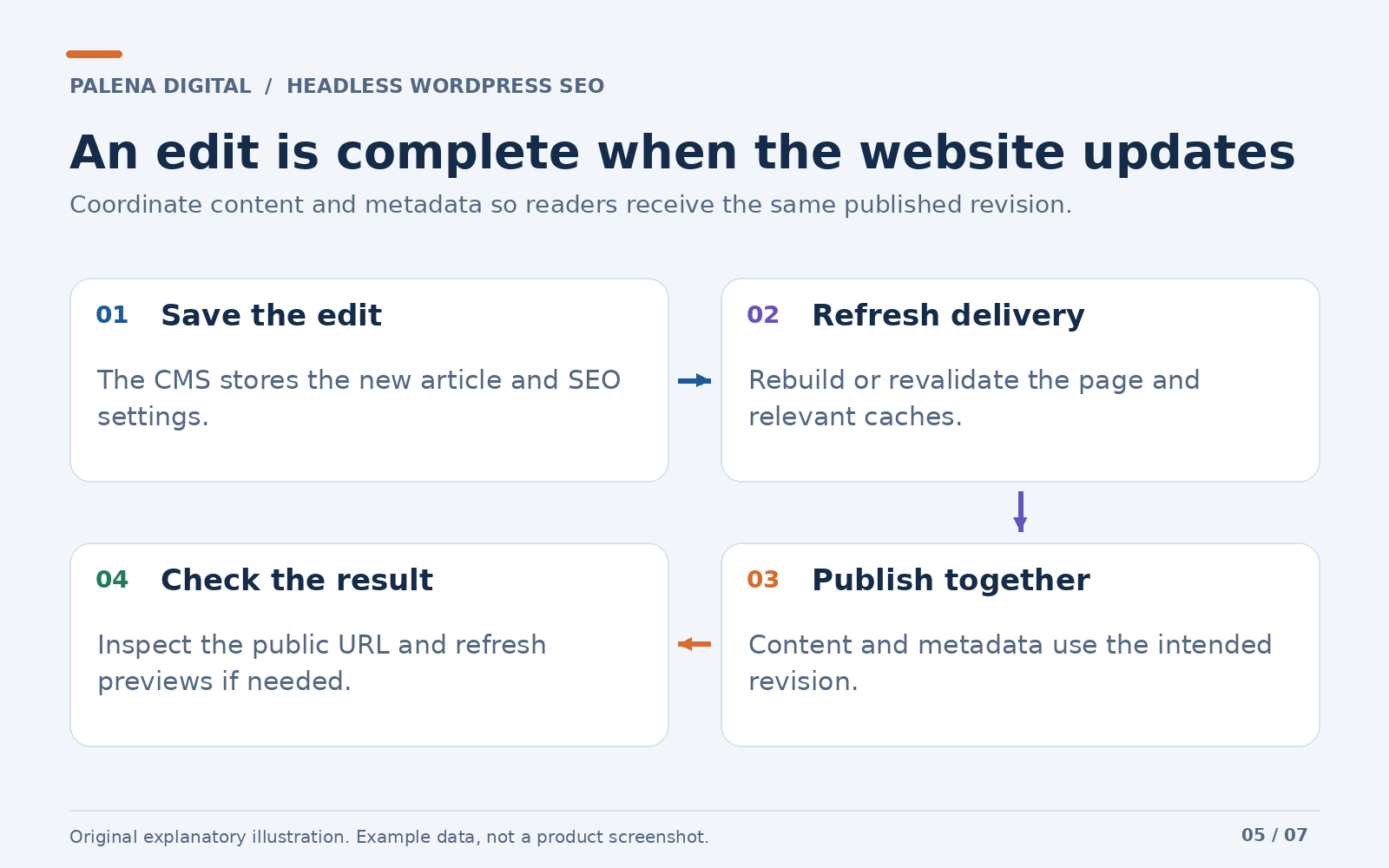
An integration can be correct on launch day and become unreliable when someone edits an article. That usually happens because content, metadata and generated pages refresh on different schedules.
Consider this fictional sequence. An editor changes an article title at 10:00. The CMS saves it immediately. The content API now has the new value, but the public page remains an earlier static build. A visitor at 10:15 still sees the old headline and preview information.
Nothing about that sequence requires a plugin malfunction. The publishing pipeline simply has not delivered the latest version.
For each meaningful edit, define what should happen next. A static site might start a deployment. Another application might revalidate the affected page. A server rendered site might invalidate its metadata and content cache together.
Use a shared content version or coordinated refresh policy where practical. Otherwise, readers may receive a new article body with an old title or schema generated from a different revision.
Also decide what happens when the CMS is temporarily unavailable. For an existing article, retaining a known good published version may be appropriate. For an article with no usable metadata or content, your publishing system should report the failure clearly rather than silently publishing an unrelated default page.
Finally, secure any publishing webhook. A public endpoint that triggers deployments or cache clearing should verify that the request is authorized.
These details make the difference between a successful demonstration and a system an editor can trust every week.
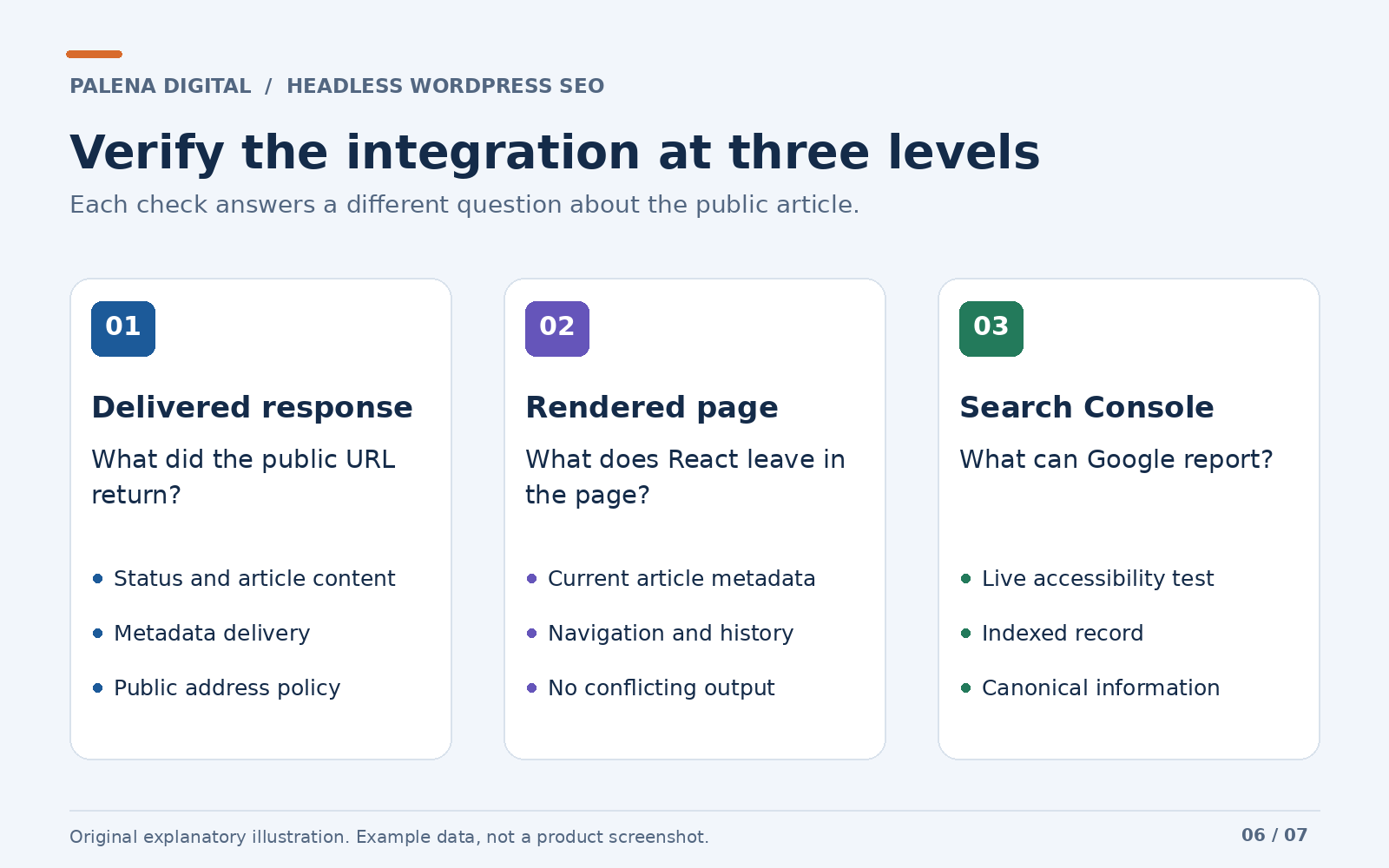
Verify the public page at three levels
Testing becomes easier when you separate delivery, browser behavior and search engine processing.
1. Inspect the response from the public address
Request the final article URL directly. Check the status code, returned content and metadata delivery expected for your architecture.
For a conventional static or server rendered page, inspect the delivered HTML for the article and its essential SEO elements. If your framework intentionally streams metadata, account for its documented behavior and test the relevant crawler responses as well.
The inspection must start at the public website. A correct response from the WordPress API does not prove the frontend used it.
Also request a nonexistent article. The website should handle missing content deliberately. Returning a generic successful page for every invalid path can conceal routing problems. Google’s HTTP status guidance explains how response codes communicate success, redirects and errors.
2. Inspect the page after React renders
Open the browser’s developer tools and examine the rendered document. Confirm that titles, descriptions and canonicals remain correct after the application starts.
Then navigate to another article without refreshing the browser. The second article should not retain the first article’s title, image, canonical or schema.
Use the browser’s back and forward controls too. Navigation state can reveal problems that a single direct request misses.
While testing, inspect links between articles. Google recommends usable anchor elements with href attributes, supported by descriptive link text. See its crawlable link guidance. A card that responds to a JavaScript click deserves inspection to ensure it also exposes a real link.
3. Inspect Google’s view
Use the public URL in Search Console’s URL Inspection tool. Check the available crawl and rendering information, indexing restrictions, and canonical details.
Distinguish the indexed record from a live test. They answer different questions. The live test helps investigate current accessibility, while the indexed record reflects Google’s recorded processing of the URL. Search Console’s inspection documentation explains the available reports and their limitations.
Requesting indexing can be useful after an important correction, but it is not a promise that a page will be indexed or appear in a particular position.
A practical acceptance checklist
Use this table as a reusable review sheet. Record actual observations for your own website rather than treating the expected result as proof that it passed.
| Check | Expected result | Where to verify |
|---|---|---|
| Direct article request | Correct article loads at its public address | Public URL and response |
| Page title | Describes the current article | Delivered and rendered document |
| Meta description | Matches the intended editorial description | Metadata output |
| Canonical | Declares the intended public article URL without conflict | HTML and HTTP headers |
| Indexing policy | Public article has no unintended restriction | HTML, headers and Search Console |
| Social preview | Correct title, image and public address | Target sharing platform |
| Structured data | Accurate entities, addresses and dates | Output and validation tools |
| Internal links | Relevant pages expose usable links | Rendered markup |
| Sitemap | Lists intended public URLs | Sitemap and Search Console |
| Missing article | Produces appropriate missing content behavior | Invalid public route |
| Article navigation | Metadata changes with the article | Browser navigation |
| Editorial update | Content and metadata refresh within the agreed window | Controlled edit and inspection |
Keep the observations with the release record. When a later change breaks something, you will have a concrete comparison rather than a vague memory that the site used to work.
Common problems and how to investigate them
The metadata endpoint does not respond
Confirm that headless support is enabled and your request uses the documented endpoint and a complete CMS URL. Then inspect routing, security and hosting logs. Rank Math’s headless documentation covers common request errors and firewall interference.
If a security rule blocks the request, adjust the relevant rule narrowly. Disabling website protection wholesale is unnecessary for a metadata integration.
The API works, but the public page has no metadata
Trace the handoff. Did the application receive the response? Did parsing succeed? Did the chosen rendering system publish the normalized values? Is a later component replacing them?
Inspect the deployed version too. A local change does not prove that the production website contains the same implementation.
Every article has the same title
Check whether the application uses a homepage default for every route, fetches metadata for the wrong CMS URL, or caches all responses under the same key.
A cache key needs to distinguish the content whose metadata it stores. The exact implementation depends on your framework, but the underlying requirement is stable.
The canonical address points to WordPress
Review your public URL mapping. Check whether the transformation covers both host and path, and whether another metadata provider adds a second canonical declaration.
The public page still shows an old description
Inspect each layer in sequence: saved CMS setting, API response, application cache, generated page and sharing platform cache. Fix the layer that actually contains the stale value.
There are duplicate titles or schema entities
Identify every system generating SEO output. A global template, frontend SEO component, CMS response and third party integration may all contribute.
Assign each output type a clear owner. Then remove conflicting output while retaining complementary information that serves a legitimate purpose.
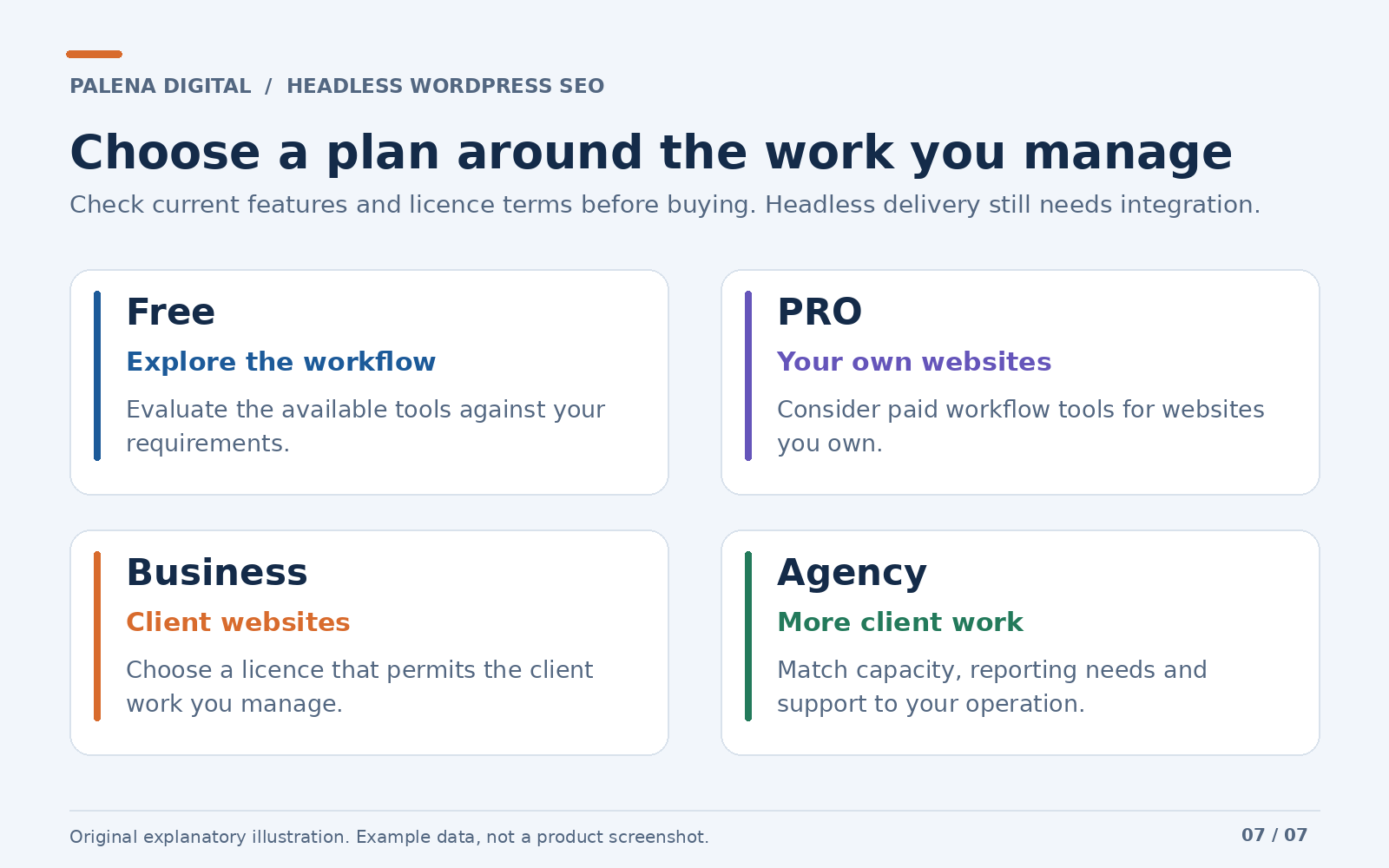
Should you use Rank Math Free, PRO, Business or Agency?
Start with two questions: whose websites are you managing, and which tools would improve the way you publish and monitor content?
Rank Math offers Free and paid options with different capabilities. Its current product pages list paid tools such as keyword tracking, advanced schema controls and SEO reporting. Check the exact feature availability, limits and support attached to the plan you are considering. The official feature comparison and licensing details are the appropriate references.
| Your situation | A sensible starting point | What to check before deciding |
|---|---|---|
| You are evaluating the workflow | Assess Rank Math Free against your needs | The features and metadata output available in your installation |
| You own and manage your websites | Consider PRO if its added tools solve a real need | Current capabilities, limits and ownership terms |
| You maintain websites for clients | Evaluate Business | Permission for client use, capacity and reporting needs |
| You manage a larger client operation | Evaluate Agency | Client capacity, operational needs and support |
The distinction around ownership matters. Rank Math describes PRO as covering personal websites you own, while its Business and Agency offerings address client work. A website you own can still be a commercial business website; “personal” in this context does not mean it must be a hobby.
When a paid plan becomes worthwhile
An established publication may benefit from bringing more monitoring and schema management into its existing WordPress workflow. An agency may need a plan suitable for the number and ownership of the websites it manages. Those are concrete reasons to evaluate an upgrade.
For a headless setup, confirm that monitoring uses the intended public URLs and the correct Search Console properties. Advanced features still need to fit your architecture; buying a plan does not replace that configuration work.
My recommendation is to choose the plan that improves an existing process or meets a defined requirement. That produces a more useful investment than buying capacity you do not yet need.
Ready to evaluate the fit? Explore Rank Math and review the available plans. Compare the features, ownership permissions and current checkout terms before making your choice.
Measure results without confusing implementation with growth
A successful integration gives you evidence that the website delivers its content and metadata as intended. Organic growth is a separate outcome that needs time and measurement.
Track the public site’s impressions, clicks, queries and indexing information through Google Search Console. Review changes over a meaningful period, while accounting for publishing activity, competition, seasonality and other website changes.
For example, correcting a canonical problem is a technical improvement you can document. Claiming that the correction caused every later traffic increase requires much stronger evidence.
The same discipline applies to plugin scores. An editorial checklist can reveal things to improve, but a favorable score does not establish that your public React page delivered the settings correctly or earned a particular search position.
Content still needs a useful purpose, clear explanations and trustworthy information. Google’s helpful content guidance emphasizes creating material for people and providing evidence for claims. That is a better long term standard than writing primarily to satisfy a numerical score.
Frequently asked questions
Does Rank Math work with a React website?
Yes, when WordPress is the CMS and the React application integrates the metadata it provides. A website built entirely in React without WordPress cannot install the WordPress plugin directly into its frontend.
Will installing Rank Math automatically optimize my headless frontend?
Installation establishes the plugin inside WordPress. Your separate website still needs a working metadata integration, an appropriate rendering strategy and correct public URL handling.
Can I use Rank Math when my content uses GraphQL?
Your content transport and metadata transport can be separate. An application can retrieve content through GraphQL and request Rank Math metadata through its REST endpoint. Do not assume installing a GraphQL plugin automatically exposes every Rank Math field.
Do I need Next.js to use Rank Math with headless WordPress?
No. The integration can be implemented with different frontend technologies. Next.js offers framework conventions that may help, but the requirement is correct retrieval and delivery of metadata for your public pages.
Can the CMS and public website use different domains?
Yes. Define the relationship between their routes and check the resulting canonical addresses, schema references, previews and sitemaps. Different domains require deliberate configuration, especially when their paths differ too.
Will Rank Math guarantee that my articles rank?
No. It can support your editorial SEO workflow and metadata generation. Search visibility also depends on the content, competition, accessibility and how search engines evaluate the page.
How can I tell whether the integration works?
Check a public article directly, inspect its delivered and rendered output, test navigation and editorial changes, and review the public URL in Search Console. Keep the findings rather than relying solely on a dashboard preview.
Is Rank Math a sensible choice for headless WordPress?
For a business that wants WordPress publishing with a custom React website, Rank Math is a sensible option to evaluate. It provides a documented route for retrieving SEO metadata and lets editors keep those decisions close to the content they manage.
Its strongest appeal is the combination of editorial control and a defined technical handoff. Your writer can work in WordPress while your developer builds a public website around the experience your business needs.
The implementation still deserves care. Establish the URL policy, choose a rendering strategy, coordinate publishing updates and verify the actual output. Start with one article, make the connection dependable, then extend the same process across your content types.
If you are ready to create that workflow, explore Rank Math here. Start with the requirements of your website and choose the available plan that fits the work you need to do.
If you also need help connecting React to WordPress or reviewing how SEO information reaches your public pages, speak with Palena Digital. We can discuss the publishing workflow, website structure and development work your business needs.
Comments
No published comments yet.
Comments may be held for moderation before appearing.